This Blog is mainly on SAP Exam Questions and Selected "How-to" SAP processes
Tuesday, January 27, 2026
Q&A in Class (2026-01-27) S4611
--------------------------------------------------------------------------------------------------------------------------------------------------------------------------------------------
Question: Overview of the Big Picture of S/4HANA Transportation Management.
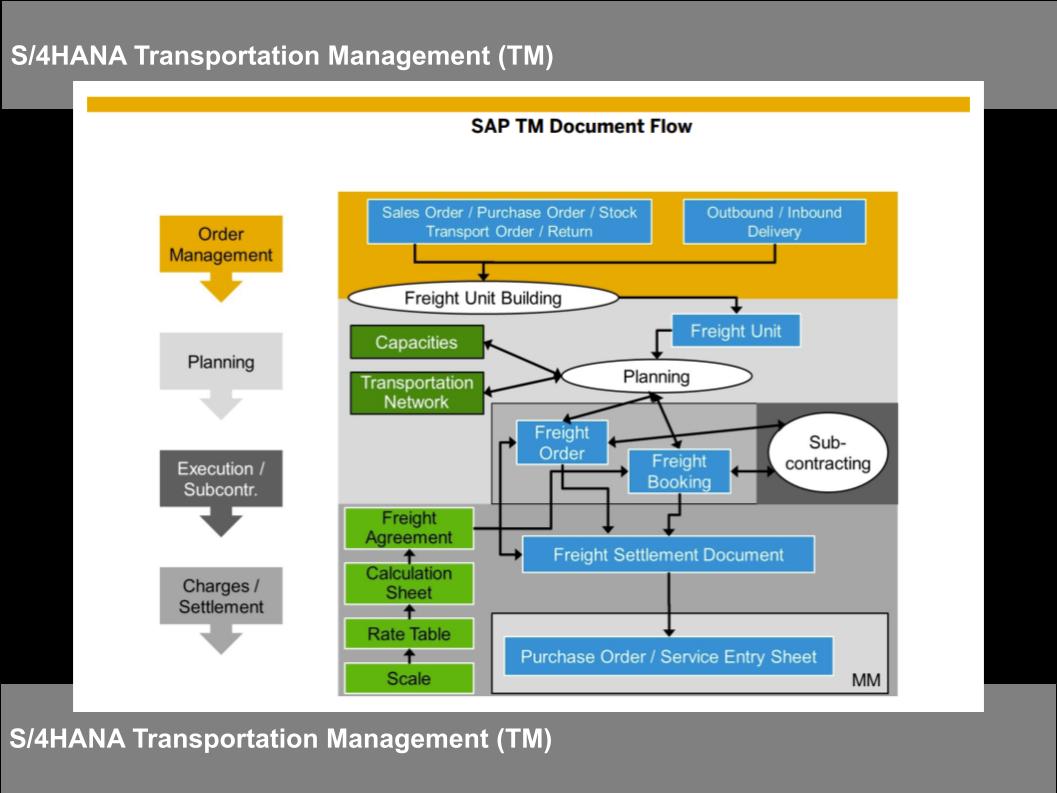
Answer: S/4HANA TM is planned to replace the LE-TRA (Classic Transportation) module with a dead line of 2017.
https://docs.google.com/BigPicture/
--------------------------------------------------------------------------------------------------------------------------------------------------------------------------------------------
Question: a View of the End-to-End of Outbound with TM processing until Invoice.
RoadAir FreightRailSea Freight
https://docs.google.com/End-to-End-OutboundwithTM/
--------------------------------------------------------------------------------------------------------------------------------------------------------------------------------------------
Question: What is the basic difference between "Ocean Freight" and "Road Freight" TM Processes ?
Answer: "Road Freight" scenario are usually for "Shor Haul" compared to "Ocean Freight" scenario which are considered to be "Long Haul". Therefore, it is logical for "Ocean Freight" TM cases to have additional processes to cater for the management of long haul and Vessel tracking functionalities:- This include (4) Ocean Freight Booking for Freight Units for booking of Containers and Vessels space with an expected "longer lead time" for Vessel booking and confirmations.
- Additional steps of (5), (6), (7) to confirm the Subcontractor who will manage the pickup of the FU and Delivery to the Port for loading into the Container or Vessel.
- We will expect either the same transporter from Warehouse to Port or different transporter when Vessel arrive to load the FU to the Truck dispatching to the Intermediary or Final destinations.
- Hence, such a process could potentially involve 1 or more 3PL transportation.
- Shipping Point (from the Sales/Delivery item).
- Outbound Delivery Type (via the Sales Order Type 1:1 relationship).
- Shipping Condition (Sold-to Party.
- Freight Building Rule.
- Stage Building Rule.
- etc.
Answer: Mapping HR Org Unit to MM Purchasing Group and Purchasing Organization is an essential step to default the Purchasing Group & Purchasing Org to the FU or FO so that there can be used as default data to create the Purchase Order at time of Freight Settlement Document (FSD) Posting.
Answer: Highly recommend to keep the LE-Route configurations to get the desired Lead Time Scheduling for Schedule Lines to the Sales Order confirmation date backward or forward scheduling.
Answer: It is important to understand that there are "MINOR" differences between the classic LE-TRA vs the TM Basic except for LBN (Logistics Business Network) and ASN (Advanced Shipment Notification).
- S/4HANA TM Basics offers LESS Transpiration scenarios compared to Advanced TM.
- GIS feature for management transportation processing is only offered via Advanced TM.
- You can also expect the Advanced Optimization tools are only available in Advanced TM.
- Interesting that SAP only offers TM Analytics when the customer decided to use Advanced TM.
- Freight forwarders act as an intermediary between the company who makes the shipment and the final destination for the goods that this scenario is only offered via the Advanced TM.
Saturday, January 24, 2026
Q&A in Class (2026-01-23) EWM100
--------------------------------------------------------------------------------------------------------------------------------------------------------------------------------------------
Question: Review for EWM MM-EWM Inbound Processing.
Answer: Here is an example of Inbound Delivery to EWM Storage in 2 methods:
Click to the following:
--------------------------------------------------------------------------------------------------------------------------------------------------------------------------------------------
Question: Review for EWM SD-EWM Outbound Delivery Processing.
Answer: Here is an example of Outbound Delivery to EWM processing.
--------------------------------------------------------------------------------------------------------------------------------------------------------------------------------------------
Question: An Overview of S/4HANA EWM.
Answer: see the presentation below:
https://docs.google.com/EWM-BigPicture/
--------------------------------------------------------------------------------------------------------------------------------------------------------------------------------------------
Question: Demonstration the process flow of SD Outbound Delivery with EWM processing.
Answer: Check the steps for Outbound Delivery with EWM:
https://froggysap.blogspot.com/2023/09/sap-scm-ewm-process-flow-of-ewm.html
--------------------------------------------------------------------------------------------------------------------------------------------------------------------------------------------
Question: Review of Storage Process Control example for Inbound Delivery.
--------------------------------------------------------------------------------------------------------------------------------------------------------------------------------------------
Question: Review of Storage Process Control example for Outbound Delivery.
Answer: Here is an example of EWM Outbound Delivery with Storage Process Control.
Click to the following:
--------------------------------------------------------------------------------------------------------------------------------------------------------------------------------------------
Question: Review of Inbound process and configurations.
Answer: Inbound Process Configurations Blog Posts references
Click to the following:
--------------------------------------------------------------------------------------------------------------------------------------------------------------------------------------------
Friday, January 16, 2026
Q&A in Class (2026-01-16) EWM100
--------------------------------------------------------------------------------------------------------------------------------------------------------------------------------------------
Question: What is the purpose of the SCU (Supply Chain Unit) in the EWM system ?
Answer: In SAP EWM, a Supply Chain Unit (SCU) represents a physical or organizational entity involved in logistics processes.- A Plant SPCW contain raw material storage locations of RD00 and RD01 which is linked to a EWM warehouse E100, the warehouse address is at the East Road with Gate 1 entered the Yard for the Goods Receipt Docking. A SCU (Supply Chain Unit) created also as E100 will be set using the East Road Gate 1 address with the Warehouse having activity attributes as a Warehouse and Goods Receipt Office. The Geo Data for SCU E100 is X1 Longitude and Latitude.
- The same Plant SPCW also contain finished product storage locations of AF00 and AF01 which is linked to another EWM warehouse of E101, but this warehouse address although the SAME but the exit gate for Outbound Delivery is via Gate 2 on the West Road. AND the SCU (Supply Chain Unit) will be created as E101 (same as the EWM warehouse E101) but will be assigned with activity attributes as a Warehouse and Shipping Office. The Geo Data for SCU E101 is X2 Longitude and Latitude.
- One Business Partner as SPCW code same as Plant code SPCW is created to be assigned to the Plant SPCW and also contain attributes as Custodian, Party Entitled to Disposal, and Ship-to Party AND the Single BP is assigned to both SCU E100 and SCU E101; as regardless of either Warehouse, the stock responsibilities of the raw materials SLoc at RD00 or RD01 OR finished goods SLoc at AF00 or AF01 are to ONE Plant SPCW.
- It is important to note that there is 1:1 relationship between the SCU (Supply Chain Unit) to the EWM Warehouse number.
- It is highly recommended to create the SCU code = EWM Warehouse number.
--------------------------------------------------------------------------------------------------------------------------------------------------------------------------------------------
Question: What is the Relationship between Custodian, Default Party Entitled to and Plant in S/4HANA?
Answer: In the above configuration is where the PLANT to link to the Disposal Party and hence also to the Custodian.
--------------------------------------------------------------------------------------------------------------------------------------------------------------------------------------------
Question: How is the Plant generated in S/4HANA EWM?
Answer: Use Program "/SAPAPO/CREATE_LOCATION" via SA38 to Create/Generated Location for EWM for Business Partner, Plant, Shipping/Receiving Point and MRP Area.
See the following Blog Post:
--------------------------------------------------------------------------------------------------------------------------------------------------------------------------------------------
Question: Review for EWM MM-EWM Inbound Processing.
Answer: Here is an example of Inbound Delivery to EWM Storage in 2 methods:
Click to the following:
--------------------------------------------------------------------------------------------------------------------------------------------------------------------------------------------
Question: Review for EWM SD-EWM Outbound Delivery Processing.
Answer: Here is an example of Outbound Delivery to EWM processing.
--------------------------------------------------------------------------------------------------------------------------------------------------------------------------------------------
Question: Review of Storage Process Control example for Inbound Delivery.
--------------------------------------------------------------------------------------------------------------------------------------------------------------------------------------------
Question: Review of Storage Process Control example for Outbound Delivery.
Answer: Here is an example of EWM Outbound Delivery with Storage Process Control.
Click to the following:
--------------------------------------------------------------------------------------------------------------------------------------------------------------------------------------------
Wednesday, January 14, 2026
Sunday, January 11, 2026
Friday, January 9, 2026
Q&A in Class (2026-01-09) S4PR1
--------------------------------------------------------------------------------------------------------------------------------------------------------------------------------------------
See comprehensive SAP resources main page:
https://blog.sap-press.com/key-differences-between-sap-ecc-and-sap-s4hana/
https://learning.sap.com/video-playlists/managing-the-user-experience-of-sap-s-4hana-cloud-private-edition
https://help.sap.com/docs/SAP_FIORI_OVERVIEW/
https://fioriappslibrary.hana.ondemand.com/
https://www.sap.com/design-system/fiori-design-web/
https://sapui5.hana.ondemand.com/what-is-new-in-UI5/
https://sapui5.hana.ondemand.com/sdk/developing-apps-with-ui5-elements/
The following are Froggy's Blog Posts on some step-by-steps of Fiori Navigation:
https://froggysap.blogspot.com/sap-navigation-fiori-browser-enterprise.html--------------------------------------------------------------------------------------------------------------------------------------------------------------------------------------------
https://froggysap.blogspot.com/sap-navigation-fiori-default-values-and.html
https://froggysap.blogspot.com/sap-navigation-fiori-browser-2023.html
https://froggysap.blogspot.com/sap-fiori-save-as-new-tile-in-space-and.html
https://froggysap.blogspot.com/sap-fiori-fiori-app-for-fi-user-pfcg.html
Question: Review Fiori "Save as a New Tile" feature steps
Answer: In SAP Fiori, "Save as a New Tile" allows you to create a persistent shortcut to a currently running Fiori app or a filtered view of a worklist, saving your specific selections, filters, or the app's current state. Clicking this tile later will launch the app or worklist directly in that saved, pre-configured state, saving you time by eliminating the need to re-enter the same filters or settings each time.
See the following Blog Posts on how to "Save as a New Tile" with new Filter and new Columns Display:
--------------------------------------------------------------------------------------------------------------------------------------------------------------------------------------------
Question: Review the Business Partner.
Answer: Classic transaction code in ECC for Vendor Master Creation/Change/Display (XK01, XK02, XK03, MK01, MK02, MK03, FK01, FK02, FK03 etc) are now Obsolete in S/4HANA which is replaced by a Single transaction code "BP". In SAP S/4HANA, the Business Partner (BP) is the central and leading object used to maintain master data for both customers and suppliers. It serves as a single point of entry for managing various types of business relationships.
• The BP approach aims to harmonize master data across different SAP modules and applications, improving data consistency and simplifying data management.• BP for Vendor or Customer via "Organization" (to create Vendor or Customer)• BP for Individuals via "Persons"
• BP for Groups of People via "Groups"
Advantages:• Reduced Redundancy: Basic data like name, address, and bank details are stored centrally at the BP level, avoiding duplication.• Improved Data Consolidation: Centralized data management makes it easier to consolidate and analyze information related to business partners.• Flexibility: The BP model allows for multiple addresses, address usages, and relationships to be managed for a single BP.
--------------------------------------------------------------------------------------------------------------------------------------------------------------------------------------------
Question: Review the S/4 "Self-Service Procurement Scenario".
In SAP S/4HANA, "Self-Service Procurement" is a streamlined process that allows employees to request goods (consumables) and services directly. The process is similar to shopping in the B2C on-line shipping and is designed empower the user to make request and perform confirm of goods receipt via simplified FIORI Apps.
Answer: See the following Blog Posts and online help for the Self-Service Procurement Scenario introduced in S/4HANA:
https://froggysap.blogspot.com/2025/01/mm-pur-employee-self-service-with-lean.html
--------------------------------------------------------------------------------------------------------------------------------------------------------------------------------------------
Question: Review the S/4 "LEAN Service Procurement Scenario".
- SAP introduced Product Type Group "2" in the Material Type "SERV" that can be used to create a LEAN Service Material Master (instead of using the Service Master via AC03).
- Instead of using Service Condition, the Purchasing Info Record can be use for the LEAN Service Material.
- MIGO and ML81N is not relevant AND SAP introduce a FIORI App for the Service Entry of LEAN Service PO, but it still will create a SES (Service Entry Sheet) similar to the Service Master scenario.
- The Result the Approval of the LEAN Service will create Material Document with FICO postings.
- Invoice entry is the same for the LEAN Service PO (via MIRO).
https://froggysap.blogspot.com/2024/11/sap-mm-material-type-serv-lean-service.html
--------------------------------------------------------------------------------------------------------------------------------------------------------------------------------------------
How to Enable the Template Functionality:
- To use the template functionality, your system requires the activation of the relevant business function. This is usually a task performed by a system administrator or SAP consultant. Activate the Business Function: The functionality is available in the business function LOG_MM_CI_3 (Logistics - Materials Management, Cross-Industry 3). Your system must have this business function implemented and activated in the configuration settings. This is a one-time configuration step for the entire SAP client.
- Ensure Proper Authorization: Once the business function is active, users may also require the appropriate authorization object M_TEMPLATE to create, change, and delete public templates. A system administrator can manage these permissions.
- Verify the SAP System Version: This feature was introduced as new functionality in SAP ECC EHP 5 (Enhancement Package 5). If your organization uses an older version, the functionality may not be available.
See App ID F1990 (Click to Fiori LIbrary - Procurement Overview Page
See App ID F2872 (click to fiori library - Manage Workflows for Purchase Orders).


.jpg)
.jpg)

.jpg)
.jpg)
.jpg)


_0412_InboundwithProcessOrientedStorageCtrl_Blogged.jpg)


_Blogged.jpg)
.jpg)
_Blogged%20(2).jpg)
.jpg)
.jpg)


_Blogged.jpg)

.jpg)
.jpg)


.jpg)